20131022

[admin@srv1 ~]$ cat .screenrc
startup_message off
hardstatus alwayslastline
hardstatus string '%{= kG}[ %{G}%H %{g}][%= %{=kw}%?%-Lw%?%{r}(%{W}%n*%f%t%?(%u)%?%{r})%{w}%?%+Lw%?%?%= %{g}][%{B}%Y-%m-%d %{W}%c %{g}]'

20130508

Reserved Top Level DNS Names http://tools.ietf.org/html/rfc2606

Request for Comments: 2606 A. Panitz  BCP: 32 June 1999
Category: Best Current Practice
Reserved Top Level DNS Names
[...]
   To safely satisfy these needs, four domain names are reserved as
listed and described below.

.test
.example
.invalid
.localhost

".test" is recommended for use in testing of current or new DNS
related code.

".example" is recommended for use in documentation or as examples.

".invalid" is intended for use in online construction of domain
names that are sure to be invalid and which it is obvious at a
glance are invalid.

The ".localhost" TLD has traditionally been statically defined in
host DNS implementations as having an A record pointing to the
loop back IP address and is reserved for such use. Any other use
would conflict with widely deployed code which assumes this use.

3. Reserved Example Second Level Domain Names

The Internet Assigned Numbers Authority (IANA) also currently has the
following second level domain names reserved which can be used as
examples.

example.com
example.net
example.org

4. IANA Considerations

IANA has agreed to the four top level domain name reservations
specified in this document and will reserve them for the uses
indicated.

5. Security Considerations

Confusion and conflict can be caused by the use of a current or
future top level domain name in experimentation or testing, as an
example in documentation, to indicate invalid names, or as a synonym
for the loop back address. Test and experimental software can escape
and end up being run against the global operational DNS. Even
examples used "only" in documentation can end up being coded and
released or cause conflicts due to later real use and the possible
acquisition of intellectual property rights in such "example" names.

The reservation of several top level domain names for these purposes
will minimize such confusion and conflict.

References

[RFC 1034] Mockapetris, P., "Domain names - concepts and facilities",
STD 13, RFC 1034, November 1987.

[RFC 1035] Mockapetris, P., "Domain names - implementation and
specification", STD 13, RFC 1035, November 1987.

[RFC 1591] Postel, J., "Domain Name System Structure and Delegation",
RFC 1591, March 1994.


Eastlake & Panitz Best Current Practice [Page 3]

RFC 2606 Reserved Top Level DNS Names June 1999


Authors' Addresses

Donald E. Eastlake 3rd
IBM
65 Shindegan Hill Road, RR #1
Carmel, NY 10512

Phone: +1 914-276-1668(h)
+1 914-784-7913(w)
FAX: +1 914-784-3833(3)
EMail: dee3@us.ibm.com


Aliza R. Panitz
500 Stamford Dr. No. 310
Newark, DE 19711 USA

Phone: +1 302-738-1554
EMail: buglady@fuschia.net


Eastlake & Panitz Best Current Practice [Page 4]

RFC 2606 Reserved Top Level DNS Names June 1999


Full Copyright Statement

Copyright (C) The Internet Society (1999). All Rights Reserved.

This document and translations of it may be copied and furnished to
others, and derivative works that comment on or otherwise explain it
or assist in its implementation may be prepared, copied, published
and distributed, in whole or in part, without restriction of any
kind, provided that the above copyright notice and this paragraph are
included on all such copies and derivative works. However, this
document itself may not be modified in any way, such as by removing
the copyright notice or references to the Internet Society or other
Internet organizations, except as needed for the purpose of
developing Internet standards in which case the procedures for
copyrights defined in the Internet Standards process must be
followed, or as required to translate it into languages other than
English.

The limited permissions granted above are perpetual and will not be
revoked by the Internet Society or its successors or assigns.

This document and the information contained herein is provided on an
"AS IS" basis and THE INTERNET SOCIETY AND THE INTERNET ENGINEERING
TASK FORCE DISCLAIMS ALL WARRANTIES, EXPRESS OR IMPLIED, INCLUDING
BUT NOT LIMITED TO ANY WARRANTY THAT THE USE OF THE INFORMATION
HEREIN WILL NOT INFRINGE ANY RIGHTS OR ANY IMPLIED WARRANTIES OF
MERCHANTABILITY OR FITNESS FOR A PARTICULAR PURPOSE.

Acknowledgement

Funding for the RFC Editor function is currently provided by the
Internet Society.


Eastlake & Panitz Best Current Practice [Page 5]


Html markup produced by rfcmarkup 1.102.p1, available from http://tools.ietf.org/tools/rfcmarkup/


-- map{ map{tr|10|# |;print} split//,sprintf"%.8b\n",$_} unpack'C*',unpack'u*',"5`#8

20121030

http://blogs.dirteam.com/blogs/sanderberkouwer/archive/2008/02/23/remotely-managing-your-server-core-using-winrm-and-winrs.aspx

Remotely managing your Server Core using WinRM and WinRS
I've already shown you how to remotely manage your Server Core installations of Windows Server Core using the Remote Desktop Protocol, but using Windows Remote Management (WinRM, Microsoft implementation of WS-Management) in combination with WinRS might prove to be even more useful for day to day administration.

About WS-Management

WS-Management is a specification of a SOAP-based protocol for the management of servers, devices, applications and more. The specification is based on DMTF open standards and Internet standards for Web Services and was published in March, 2005 by a group of companies, including AMD, Dell, Intel, Microsoft, Sun Microsystems and others.
WS-Management provides a common way for systems to access and exchange management information across the IT infrastructure. The specification is quite rich, supporting much more than get/set of simple variables, and in that it is closer to WBEM or Netconf than to SNMP. A mapping of the DMTF-originated Common Information Model into WS-Management was also defined.

Remote Shell

One of the most common uses for Windows Remote Management is the Remote Shell, (WinRS) that can be used to execute a program on a remote host.

Other uses

Windows Remote Management is not a stranger to this blog. I wrote a blogpost 6 months ago on event forwarding and already looked into WinRM. You might find your Windows Remote Management is already enabled after following those directions.
This blog post will be focusing on using WinRM, combined with WinRS.

WinRM

Windows Remote Management is the server part answering the Remote Shell. In Windows Server 2008 it is not enabled by default, which is good from a security point of view.

Determining whether WinRM is configured or not

Windows Remote Management is installed by default on Windows Server 2008 and the WinRM service is set to start (delayed) automatically. The only way to determine whether Windows Remote Management is installed is by examining the output of the following command:
WinRM enumerate winrm/config/listener
or (shorter, but with the same effect)
WinRM e winrm/config/listener
When this command has no output, it means no listeners are configured and Windows Remote Management is not configured.

Enabling Windows Remote Management

Using the command line

To enable Windows Remote Shell on a server running a Server Core installation, type the following command at the command prompt of the Server Core box:
WinRM quickconfig
or (shorter, but with the same effect)
WinRM qc
The command questions whether you really want to enable Windows Remote Management:
WinRM is not set up to allow remote access to this machine for management.
The following changes must be made: Create a WinRM listener on HTTP://* to accept WS-Man requests to any IP on this machine
Make these changes [y/n]?
Press y to continue or n to cancel.
This command will perform a couple of actions. First of all it will check whether the Windows Remote Management service is started and set to start automatically. After that it creates listeners for all the network connections to accept Windows Remote Shell connections with default settings. It will also open up port 80 in the Windows Firewall.
If configuration is successful, the following output is displayed:
WinRM has been updated for remote management. WinRM service type changed to delayed auto start. WinRM service started. Created a WinRM listener on HTTP://* to accept WS-Man requests to any IP on this machine.

Using Group Policies

When you place Server Core boxes in a separate Organizational Unit in your Active Directory environment you can manage Windows Remote Management centrally.
Look for the Windows Remote Management and Windows Remote Shell Group Policy Objects (GPOs) under Administrative Templates and Windows Components.
Do not forget to also open up TCP 80 on the firewall.

Default settings

The default settings of Windows Remote Management might not suit your needs. You can change on which network interfaces Windows Remote Management listens, change the URI's and change whether WinRM will use HTTP (TCP 80) or HTTPS (TCP 443)
While WinRM listens on port 80 by default, it doesn't mean traffic is unencrypted. Traffic by default is only accepted by WinRM when it is encrypted using the Negotiate or Kerberos SSP. Enabling HTTPS is not a security measure persé. It is needed when you want to use the Windows Remote Shell (WinRS) from a host that is not in the same domain as the Server Core box. (unless you use the trick below)
Windows Remote Shell is enabled by default within Windows Remote Management. For Windows Remote Shell the default settings are:
  • Maximum of 5 concurrent users
  • Maximum of 2 shells per user
  • Maximum of 80MB memory usage per shell
  • Maximum of 5 processes per shell

Disabling Windows Remote Management

To disable Windows Remote Management you need to remove the listener. The following command can be used:
WinRM delete winrm/config/listener?IPAdress=*+Transport=HTTP

WinRS

On another computer, at a command prompt, use WinRS.exe to run commands on a server running a Server Core installation. For example, type:
winrs -r:ServerName cmd.exe
Where ServerName is the name of the server running a Server Core installation with Windows Remote Management. This will result in a remote prompt where you can happily type away your commands.

Tips and tricks

Workaround for non-domain situations

When the Server Core box and the remote host are not members of the same domain you can't connect to the Server Core box using WinRS, because of the built-in security measures. Run the following commands to lower security:
Note:
You seriously cripple the built-in security of Windows Server 2008 after running the following commands. Only apply these commands to test situations.

On the Windows server Core box

Run the following commands on the console of the Server Core box to lower security:
WinRM set winrm/config/service/auth @{Basic="true"}
WinRM set winrm/config/client @{TrustedHosts="
"}
WinRM set winrm/config/client @{TrustedHosts="
RemoteHost"}
Where RemoteHost is the host you want to be able to connect to the server.

On the remote host

Start the Command Prompt with elevated privileges. On machines with User Account Control enabled this is easily achieved by pressing the Start button, typing cmd and press CTRL and SHIFT together with Enter to run the command. Run the following commands on the remote host to lower security:
WinRM set winrm/config/service/auth @{Basic="true"}
WinRM set winrm/config/client @{TrustedHosts="
"}
WinRM set winrm/config/client @{TrustedHosts="
ServerName"}
Where ServerName is the name of the server running a Server Core installation with Windows Remote Management.
To open the Remote Shell use the following command:
winrs -r:"ServerName": –u:Domain\Username –p:Password cmd.exe
Where Domain\Username is the name of an account with administrative rights on the server running a Server Core installation with Windows Remote Management and Password is the password for the account.

Trick to get the hostname displayed

Using the Windows Remote Shell might get confusing pretty fast, since the prompt doesn't show where you're connected to or whether you're connected at all. There are some giveaways though:
  • When you type exit your command window doesn't close
  • The WinRS command is displayed in the title of your command prompt window
This can become very painful when you decide to shutdown a server and turn off the wrong server accidentally...
Arlindo Alves, the Belgian IT Pro Evangelist, has a good trick to display some extra information on the command prompt, which also works when using the Windows Remote Shell. I suggest you read his blog post on it. It entails adding an Extended String value named prompt to the following registry key:
HKLM\System\CurrentControlSet\Control\Session Manager\Environment
He fills his prompt with all kinds of stuff (which doesn't seem to get passed through completely using WinRS) but I simply add the following data to the value:
[IdentificationString]$s$p$g
Where IdentificationString is an identification string that accurately describes what the server is all about. (which in my case differs from the hostname)

Concluding

Windows Remote Management and the Windows Remote Shell are really good tools and can make your life as a systems administrators much easier. In the light of Server Core this combination of tools will not generate as much traffic as RDP'ing into a Windows Server 2008 box and can be scheduled. This might make it the ideal solution for day to day system management.
Unfortunately security is a real pain in the behind if both machines aren't in the same Active Directory domain. You'll need to type away some commands to make it work.
Arlindo Alves' tip to show the hostname of the server on both the console of the Server Core box and the remote shell might prove to be a real lifesaver.

Further reading

Installation and Configuration for Windows Remote Management
Windows Remote Management (WinRM) for Powershell and CMD on Windows 2008
Windows Server 2008 - Server Core - Change Default Prompt
Will the real Core please stand up?
WinRS: Microsoft's Disappointing Answer to SSH for Remote Administration
WS-Management: Windows Vista and Windows Server 2008
RedmondMag October 2007 - First Look: WinRM & WinRS
Configuring Windows Server 2008 Server Core Basic Networking Settings
Connecting to WinRM with Windows Vista
How can I remotely run commands on a Windows Vista or Windows Server 2008 box?
Posted: Saturday, February 23, 2008 11:19 PM by Sander Berkouwer

Comments

The things that are better left unspoken said:

Server Core installations can be specifically targeted at situations where single server roles are needed. Combining some of these roles on one server might also be very powerful, as I will show you in this post of my Easter SC'enarios series, where I'll try to construct the ultimate Branch Office server using Server Core roles. The roles and features I'll be using are:
  • Active Directory Read Only Domain Controller
  • Active Directory Integrated Dynamic DNS Server and DHCP Server
  • File Server with Distributed File System and Bitlocker Drive Encryption
  • Windows Backup
This will result in a headless server, that can be safely stored in a kitchen cupboard of a remote location of your company.
# March 24, 2008 1:42 AM

The things that are better left unspoken said:

Server Core installations can be specifically targeted at situations where single server roles are needed. Combining some of these roles on one server might also be very powerful, as I will show you in this post of my Easter SC'enarios series, where I'll try to construct the ultimate Branch Office server using Server Core roles. The roles and features I'll be using are:
  • Active Directory Read Only Domain Controller
  • Active Directory Integrated Dynamic DNS Server and DHCP Server
  • File Server with Distributed File System and Bitlocker Drive Encryption
  • Windows Backup
This will result in a headless server, that can be safely stored in a kitchen cupboard of a remote location of your company.
# March 24, 2008 1:51 AM

TrackBack said:

To use WinRM, the hosts communicating with it will need to be members of the same domain as the WinRM host. If this is not the case, I recommend you consult the different WinRM security scenarios in the article “Remotely managing your Server Core using WinRM and WinRS”.
# August 23, 2008 2:56 PM

Jonathan's Virtual Blog - Thinking Outside the Physical Box said:

What is WinRM. What's new in Windows Vista, Windows Server 2003 R2, Windows Server 2008 (and Server 2008 Core)
# January 9, 2009 2:44 PM

TrackBack said:

Для использования WinRM все узлы, взаимодействующие с ним, должны быть членами того же домена, что и узел с WinRM. Если в вашем случае это не так, рекомендую ознакомиться с различными сценариями безопасности в статье ‘Remotely managing your Server Core using WinRM and WinRS‘.
# January 12, 2009 11:41 AM

The things that are better left unspoken said:

Looking for a complete resource on remotely managing your Server Core box? Look no further! I've done
# April 12, 2009 4:50 AM

?????????????????? » Windows Server 2008 WinRM???WinRS????????????????????? said:

为了使用WinRM,与之连接的主机必需与WinRM主机是相同域的成员。 如果情况不是这样,我建议你参考文章“Remotely managing your Server Core using WinRM and WinRS里描述的不同安全情况。
# July 22, 2009 1:13 PM

Blog Team TechNet Italia said:

Buon inizio di settimana a tutti. Oggi vi propongo la seconda parte della guida che Ermanno Goletto


-- map{ map{tr|10|# |;print} split//,sprintf"%.8b\n",$_} unpack'C*',unpack'u*',"5`#8

20120826

cross platform midi network sync between linux, windows and mac

Some pages about cross platform midi synchronisation between apple mac linux windows and arbitrary devices ( dsmidi, ios, ipads, androids, .... ) let them all play together :D http://nerds.de/en/loopbe1.html LoopBe1 A Free Virtual MIDI Driver LoopBe1 is an internal MIDI device for transferring MIDI data between computer programs. Basically LoopBe1 is an "invisible cable" to connect a MIDI outport of an application to any other application´s MIDI inport. All MIDI data sent to the program´s output is channeled to the receiving applications in realtime. You may connect up to 8 applications to LoopBe's inport and up to 8 applications to the outport, all sending and receiving at the same time dsmidiwifi dsmi http://dsmi.tobw.net/ DSMI consists of libdsmi An open source library for the DS (using devkitARM and libnds) and the iPhone (using XCode) that makes it easy to write software that acts as a MIDI controller or MIDI client. DSMIDIWiFi Server An application that runs on the computer and forwards the MIDI messages received via Wifi to MIDI applications. The DSMIDIWiFi server is open source and is available for MacOS X (intel/ppc) Linux Windows (guess who's the ugliest) http://www.tobias-erichsen.de/software/rtpmidi.html rtpMIDIdownload rtpMIDI rtpMIDI tutorial Network MIDI driver for Windows XP up to Windows 7, 32 and 64 bit. Compatible to the network MIDI included in Apple OS-X and iOS 4.2 http://wifimidi.com/ The Missing Link OSC/MIDI Translator is a standalone hardware device which contains its own WiFi radio, and translates specially-coded OSC messages sent from your mobile device or computer into standard MIDI messages to control synthesizers, drum machines, mixers, digital audio workstations, or anything which responds to MIDI commands. It does this with low latency, high flexibility and configurability, and without the need for a computer anywhere in the control chain. Multiple wireless OSC devices may connect simultaneously to The Missing Link, making collaboration easy. http://opensoundcontrol.org/ OSCulator is needed for Mac OSX and LoopBe1 (or another virtual MIDI driver) is needed for Windows OS. http://www.osculator.net/ "OSCulator connects your devices transforming them into powerful instruments" http://nerds.de/en/loopbe1.html A Free Virtual MIDI Driver LoopBe1 is an internal MIDI device for transferring MIDI data between computer programs. Basically LoopBe1 is an "invisible cable" to connect a MIDI outport of an application to any other application´s MIDI inport. All MIDI data sent to the program´s output is channeled to the receiving applications in realtime. You may connect up to 8 applications to LoopBe's inport and up to 8 applications to the outport, all sending and receiving at the same time. http://www.iannix.org/documentation/EN/intro.html IanniX is a graphical open-source sequencer, based on Iannis Xenakis works, for digital art. IanniX syncs via Open Sound Control (OSC) events and curves to your real-time environment. http://www.nerds.de/en/ipmidi.html MIDI over Ethernet ports - send MIDI over your LAN. You can route MIDI over your Ethernet network, using ipMIDI ports to send and receive MIDI data between computers connected to your LAN. For example, if you have a m usic studio with several computers connected via MIDI interfaces and MIDI cables, ipMIDI will replace them all. Any MIDI application on the LAN can communicate with any other without any new physical connections, eliminating separate MIDI cables and additional hardware interfaces and if you are running a wireless IP network (i.e. 802.11 g/n) you don’t need any cables at all! This is becoming more in demand, the ability to just establish a temporary local wireless network http://midiio.sapp.org/ The Cross-platform MIDI software interface for C++ programming. http://jackaudio.org/download http://jackaudio.org/netjack netJACK1, also known as "netone" Designed and implemented primarily by Torben Hohn, this is the most widely used JACK-over-a-network system. Exists for Linux, OS X and Windows. Can be run with and without data compression. netJACK2 Designed and implemented primarily by Romain Moret at GRAME. Exists for Linux, OS X and Windows. No data compression. jack.trip Designed and implemented by the Soundwire group at CCRMA at Stanford University. Exists for Linux, and OS X. No synchronization, variable data compression. http://www.humatic.de/htools/nmj/ nmj - Network MIDI for Android™ & desktop Java nmj is a pure Java MIDI over ethernet solution for Android™ and desktop Java on all major operating systems, compatible with RTP MIDI (as specified in RFC 4695 and implemented in Apple's Network MIDI in OS X) ipMIDI (and other "raw" solutions like Midi2Net) nmj provides a user defineable number of MIDI channels and is fully configureable through a simple java api. http://mac.freecode.com/projects/multimidicast multimidicast sends and receives MIDI from ALSA sequencers over the network. It uses UDP multicast datagrams, and is thus subscriptionless and plug'n'play. It is designed to interoperate with the Windows software ipMIDI. http://www.rncbc.org/drupal/node/13 Projects http://sourceforge.net/projects/qjackctl http://jackaudio.org 24 January, 2007 - 23:14 — rncbc QjackCtl - JACK Audio Connection Kit Qt GUI Interface QjackCtl is a simple Qt application to control the JACK sound server daemon, specific for the Linux Audio Desktop infrastructure. Written in C++ around the Qt4 toolkit for X11, most exclusively using Qt Designer. Provides a simple GUI dialog for setting several JACK daemon parameters, which are properly saved between sessions, and a way control of the status of the audio server daemon. With time, this primordial interface has become richer by including a enhanced patchbay and connection control features. http://sourceforge.net/projects/qsynth http://www.fluidsynth.org Qsynth - A FluidSynth Qt GUI Interface Qsynth is a FluidSynth GUI front-end application written in C++ around the Qt4 toolkit using Qt Designer. Eventually it may evolve into a softsynth management application allowing the user to control and manage a variety of command line softsynth but for the moment it wraps the excellent FluidSynth. FluidSynth is a command line software synthesizer based on the Soundfont specification. http://sourceforge.net/projects/qsampler http://www.linuxsampler.org Qsampler - A LinuxSampler Qt GUI Interface QSampler is a LinuxSampler GUI front-end application written in C++ around the Qt4 toolkit using Qt Designer. At the moment it just wraps as a client reference interface for the LinuxSampler Control Protocol (LSCP). LinuxSampler is a work in progress. The goal is to produce a free, open source pure software audio sampler with professional grade features, comparable to both hardware and commercial Windows/Mac software samplers. The initial platform will be Linux because it is one of the most promising open source multimedia operating systems. Thanks to various kernel patches and the Jack Audio Connection Kit, Linux is currently able to deliver rock solid sub-5 millisecond MIDI-to-Audio response. http://sourceforge.net/projects/qtractor Qtractor - An Audio/MIDI multi-track sequencer Qtractor is an Audio/MIDI multi-track sequencer application written in C++ with the Qt4 framework. Target platform is Linux, where the Jack Audio Connection Kit (JACK) for audio, and the Advanced Linux Sound Architecture (ALSA) for MIDI, are the main infrastructures to evolve as a fairly-featured Linux desktop audio workstation GUI, specially dedicated to the personal home-studio. http://sourceforge.net/projects/qxgedit QXGEdit - Qt XG Editor QXGEdit is a Qt GUI for editing MIDI System Exclusive files for XG devices (eg. Yamaha DB50XG). http://sourceforge.net/projects/qmidictl http://garage.maemo.org/projects/qmidictl QmidiCtl - A MIDI Remote Controller via UDP/IP Multicast QmidiCtl is a MIDI remote controller application that sends MIDI data over the network, using UDP/IP multicast. Inspired by multimidicast (http://llg.cubic.org/tools) and designed to be compatible with ipMIDI for Windows (http://nerds.de). QmidiCtl has been primarily designed for the Maemo enabled handheld devices, namely the Nokia N900 and also being promoted to the Maemo Package repositories. Nevertheless, QmidiCtl may still be found effective as a regular desktop application as well. http://sourceforge.net/projects/qmidinet QmidiNet - A MIDI Network Gateway via UDP/IP Multicast QmidiNet is a MIDI network gateway application that sends and receives MIDI data (ALSA Sequencer) over the network, using UDP/IP multicast. Inspired by multimidicast (http://llg.cubic.org/tools) and designed to be compatible with ipMIDI for Windows (http://nerds.de). http://llg.cubic.org/tools/ multimidicast sends and receives MIDI from Alsa sequencers over network. http://portawiki.abnoctus.com/view/MidiOverIP.html Linux has a couple of options that work fine, multimidicast is nice and simple and does exactly what I wanted it too. Trouble is, the Windows side is a pay tool to be found at http://nerds.de, not free software. https://github.com/teknopaul/midiOverIP At the end of the day I have got somewhere, I now have Linux and Windows talking happily over midi. I can plug the hardware device in either PC and bang the keys and make that trigger whatever I like. Latency in Linux is exceptionally low, not so in Windows. Tomorrow's job is to get Windows midi to play the note when I tell it to not 100ms after. http://openmuse.org/transport/mip_oview.html Overview of Current Activity in MIDI Over IP Significant current efforts include MWPP, DMIDI, NetMIDI, MIDIOverLAN+ and iMIDI: -- echo -e "\e#8"

20110511

http://remysharp.com/2010/10/08/what-is-a-polyfill/

A polyfill, or polyfiller, is a piece of code (or plugin) that provides the technology that you, the developer, expect the browser to provide natively. Flattening the API landscape if you will.

Alex Sexton also classifies polyfilling as a form of Regressive Enhancement. I think that sums it up nicely.
Paul also defines it as:
A shim that mimics a future API providing fallback functionality to older browsers.

Some Examples

Here's an example: sessionStorage is available in all the latest browsers (IE8 and upwards) but isn't in IE7 and below.
A polyfill can be used to plug the support for older browsers that don't provide sessionStorage.
Now with the polyfiller in place, as a developer I can rely on using the Web Storage API (for sessions) and not have to feature test in my code or fork to handle different situations.
Another example is providing canvas support in IE. This is really where the poly part can be seen. If there's no native canvas, we can provide canvas support using Silverlight. If Silverlight isn't available, we can drop down to using VML using excanvas (note that excanvas actually does also include a Silverlight bridge which I'd expect it would try first anyway). Using these two scripts provides the developers with (faily) solid canvas backup should it not be native in the browser.

Where it's from and where it's going

Earlier on this year I co-authored Introducing HTML5 with Bruce Lawson. During the R&D time I was looking at shims and techniques to plug missing APIs but they weren't quite progressive enhancement. I wanted a single word that represented this idea that there was a 'thing' that could plug browsers but wasn't progressive enhancement but wasn't graceful degradation either.
Polyfilling seemed to fit what I wanted to say (in my head!).
Ployfilla is a UK product known as Spackling Paste in the US. With that in mind: think of the browsers as a wall with cracks in it. These polyfillers help smooth out the cracks and give us a nice smooth wall of browsers to work with.
I tentatively used the new term during my HTML5 talk for ThinkVitamin back in June, but I didn't want to push it for fear of trying too hard to push a new term out. However I did sneak it in to Introducing HTML5, which I can only assume lead to what happened recently.
Recently at JS Conf, Paul Irish released a list of polyfills and shims - an awesome resource list to save us developers the pain of older browsers.
It looks like polyfilling has some legs, so let's start using them, and dragging older (and even the newer) browsers up to our expectations.

20110411

sqlite


// Create an SQLite DB in the file test.sqlite

$db = new SQLiteDatabase("test.sqlite");

$db->query("BEGIN;

CREATE TABLE dbtest(id INTEGER PRIMARY KEY, article CHAR(50),price FLOAT(10));

INSERT INTO dbtest (article,price) VALUES('Book1','12.99');

INSERT INTO dbtest (article,price) VALUES('Book2','15.23');

COMMIT;");

$result = $db->query("SELECT * FROM dbtest");


// Read and show the DB we created

echo "
"; 

printf("+------------+------------------------------------------+\n"); 

printf("
Price 
Article 
\n"); 

printf("+------------+------------------------------------------+\n"); 

while ($result->valid()) { 

$row = $result->current(); 

printf("
%10s 
%-40s 
\n",$row['price'],$row['article']); 

$result->next(); 

} 

printf("+------------+------------------------------------------+\n"); 

echo "
";

unset($db);

phpinfo();

?>


-- map{ map{tr|10|# |;print} split//,sprintf"%.8b\n",$_} unpack'C*',unpack'u*',"5`#8<3'X`'#8^-@`<-CPP`#8V/C8`"

20110126

phpack A simple archiver / packer base64 encoder for php

I needed some functions to 'zip' a dir, or better unzip an inline dir from one script.
With these functions it became pretty trivial to take a directory, read all files from it and save them somewhere else.

This to make it possible to have a sort of php installer that unarchives an inline directory structure into a real dir which can be distributed as a single .php file.


1
2 $sourcedir = 'example/source';
3 $destdir = 'example/dest';
4 unpackdir(packdir($sourcedir),$destdir);
5 function packdir($td = '.') {
6 $rv = array();
7 //print "\ndoing $td";
8 foreach (scandir($td) as $tf) {
9 if ($tf != '.' && $tf != '..') {
10 if (is_dir($td.'/'.$tf)) {
11 $rv[$tf] = packdir($td.'/'.$tf);
12 } else {
13 $rv[$tf] = base64_encode(file_get_contents($td.'/'.$tf));
14 }
15 }
16 }
17 return($rv);
18 }
19 function unpackdir($filestruct,$cd = '.') {
20 foreach ($filestruct as $fn => $fv) {
21 if (is_array($fv)) {
22 createdir($cd.'/'.$fn);
23 unpackdir($fv,$cd.'/'.$fn);
24 }else{
25 unpackfile($fv,$cd,$fn);
26 }
27 }
28 }
29 function createdir($dirname) {
30 print "\nCreating $dirname.";
31 mkdir($dirname);
32 }
33 function unpackfile($fv,$cd,$fn) {
34 $fh = fopen($cd . '/' . $fn,'w+');
35 if ($fh) {
36 print_r($fh);
37 fwrite($fh,base64_decode($fv));
38 fclose($fh);
39 print "\nUnpacked $cd/$fn into $cd with ".strlen($fv)." bytes of base64.\n";
40 } else {
41 print "couldn't open $fn in write modus";
42 }
43 }
44

20101231

openDNS pitfalls

Relayman writes "Joe Mailer wanted to download an iTunes movie recently and his Apple TV told him it would take two hours. When he switched his DNS resolver settings, the download time dropped to less than 20 seconds. Apparently, iTunes content is served by Akamai which uses geolocation based on the IP address of the DNS request to determine which server should provide his content. When you use Google or Open DNS to resolve the Apple domain name, all the requests to Akamai appear to be coming from the same location and they're all directed to the same server pool, overloading that pool and causing the slow downloads. The solution: Be wary of using Google or Open DNS when downloading iTunes files or similar large files. Use your own ISP's DNS servers instead or run your own resolving DNS server."

20101229

Better google sync by putting m.google.com as EXCHANGE (??!)


How To Get MobileMe For Free Using Google and Dropbox [How To]


MobileMe for Free.
A couple of weeks ago I canceled my MobileMe account. Why? Because it didn’t do the one thing I wanted it to do: share my calendar with my wife so we could coordinate our busy lives. That’s all.
I love MobileMe’s email, calendar, contact syncing (especially on the iPhone) and even iDisk. I gave Apple a year to improve it, but nothing happpened, so I switched.
Here’s how to recreate all of MobileMe’s features for FREE (except one) and how I use it to sync my iMac, MacBook and two iPhones.

Email

After 15 years of loyalty to Yahoo, I made the switch to the evil corporation known as Google. I had a Gmail account before but decided to start fresh. I opened a new Google account and now use Gmail. My wife has been using Gmail for a while now so that part was previously done. Gmail is good, but then again, it’s hard to mess up email.

Contacts

Still in the beta phase, Google Contacts has worked wonders for me. I can edit contacts on my Macs and they show up within seconds on my iPhone. I tried editing on the iPhone but it doesn’t seem to like that. I recommend you DO NOT sync your contacts on your computers. Instead, export your contacts as a vCard and import them into Google Contacts. It will be much cleaner and easier that way.
First, export your contacts from Address Book (File>Export…>Export Group vCard). This will create a vCard. Save it to the desktop.

Next, head over to Google Contacts so you can import that vCard. Look in the bottom right-hand corner and click on Import.

Clicking on Import will bring up an Import dialog as shown below. Click on Choose File and select the vCard on your desktop. Voila! Now all of your contacts will be available via Google Sync. Winner, winner, chicken dinner!

Calendars

Google Calendar makes it so easy to share a calendar. I made a calendar, sent an email to my wife, she added it to her account and presto: shared calendar. Now I can add an event from my work computer, iPhone or any of my Macs, and my wife will see it almost instantly on her iPhone. Magic!
Let’s setup iCal to make use of your brand-spanking-new shared calendar. Open iCal, click on the iCal menu and select Preferences. When the Preferences window comes up, click on Accounts and then the plus symbol to add an account. You should get the window shown below. Enter your Google account information and your Google calendar will be imported into iCal. It will sync automatically and you are ready to add events.

Below is how your new Google calendar will look. Easy huh?

iDisk

While I barely used iDisk, I did want to keep its functionality for the rare times I need it. My solution is Dropbox, an online storage service that offers 2GB of space for free (the same as the basic MobileMe storage solution). Just download the app to all your Macs and don’t forget to download the iPhone app. After that, the setup is a breeze. Dropbox adds a folder to the Finder that looks and works just like iDisk. Here it is below the Applications and Documents folder.

Again, this 2GB solution is free. Need more space? Pay a small fee for more storage. A great application.

Get Everything In Sync

Next, I setup my iPhone to sync with all my Google applications and Dropbox. Dropbox was easy enough. I just downloaded the free app and that was done. As for Google, here is how to setup Google Sync on your iPhone:
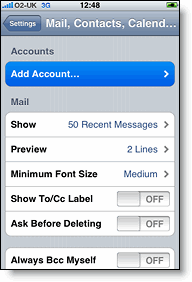
1. Open the Settings application on your iPhone’s Home screen.

2. Open Mail, Contacts, Calendars.

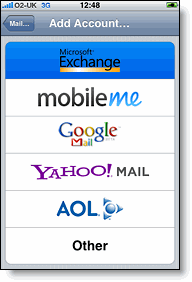
3. Tap Add Account…

4. Select Microsoft Exchange.
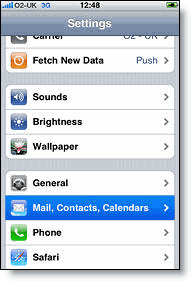
settings mail calendar contacts on iphone add mail calendar contacts account on iphone microsoft exchange
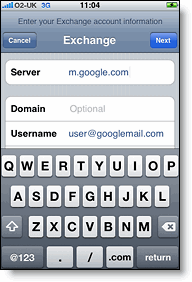
5. In the Email field, enter your full Google Account email address. If you use a Gmail address, you may see an “Unable to verify certificate” warning when you proceed to the next step. Just hit Accept/OK.

6. Leave the Domain field blank.

7. Enter your full Google Account email address as the Username.

8. Enter your Google Account password as the Password.

9. Tap Next at the top of your screen.

9a. Choose Cancel if the Unable to Verify Certificate dialog appears.

10. When the new Server field appears, enter m.google.com.

11. Press Next at the top of your screen again.
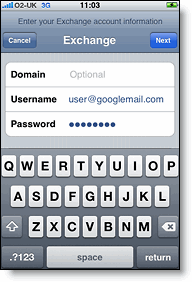
exchange domain exchange server
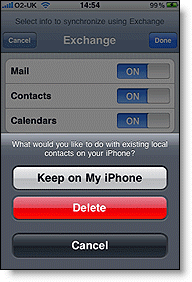
12. Select the Google services (Mail, Calendar, and Contacts) you want to sync. You want to use them all, trust me!
13. Choose to Delete Existing Contacts during the Google Sync install when prompted. If you choose to keep existing contacts, it will sync the contents of the “All Contacts” group instead. That will just make a big mess. Remember, Google Contacts already has all the contacts you need since you imported them already.
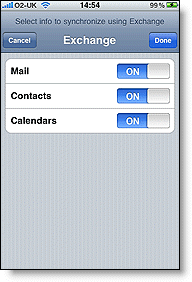
iphone exchange mail calendars contacts exchange keep on my iphone
14. Lastly, visit http://m.google.com/sync on your iPhone and login. You should see your device there. Select your device and then select which calendars you wish to sync (should be all). Select “Save” and now you are done. Give your calendar a few minutes to fully sync before you check it. You should be good to go now on your iPhone.
Now you have all the functionality of MobileMe (with the exception of Find My iPhone) for FREE, thanks to Google and Dropbox!
It took me a couple of days to work out the bugs in my system but so far I have no regrets. It is even easier if you have an email forwarding system setup. Then all you have to do is change the email address you want your email forwarded to. Otherwise, you just have a lot of email settings to update.
If you have any problems, please post them in the comments below.


About the author

jagphotog
Jose Gutierrez is a San Diego-based photographer who loves technology, specifically anything Apple (yes, even the Apple TV, thanks to Boxee!). Follow me on Twitter.
Email the author | Read more posts by Jose Gutierrez.


Comments for How To Get MobileMe For Free Using Google and Dropbox [How To]


43 comments


  1. PDM777 says:


    I have Mobile Me and my wife and I share everything…contacts, calendar, files…I am running one computer with VISTA, one with Windows 7, one with XP and two iPhones and they are all synced together. Not sure what you are talking about. We even have reminder alarms go off simultaniuly on our iPhones if we so choose. So to me mobile me is a little over priced, but worth every penny.


  2. Tom K says:


    The ‘Find my iPhone’ feature alone is worth the 67 EUR I pay each year for MobileMe. Good guide though, thanks.


  3. KMW333 says:


    Although I have moved my emails to Google and now use Google calendar for everything (which can be a bear to set up in iCal), the one thing that really keeps me hooked on MobileMe is iPhone insurance. It is imperative to me that if I lose my iPhone that I can find it, lock it or erase it remotely. That alone is worth the price (although I wish the price were less).


  4. Justin says:


    Let’s not forget about ALL of the web hosting/photo publishing/seemless integration with iWeb that MobileMe offers as well. You seem to have totally disregarded those aspects of MM. Plus, iDisk gives you loads more storage than 2gb.


  5. Gregor says:


    HI!
    I believe that Jose had a mobileme family account and he used the main account and his wife an under account. These does not work with sharing the calendar.
    And if the wife is using the same mobileme account the sharing of calendar works like charme – but there is no possibility to have own contacts for her – all is sharing now.
    That is a little pitty on mobileme :-(
    Cheers

    Gregor


  6. Matt says:


    OK..maybe it’s just me….but I already have an exchange account for work on my iPhone and it allows only one exchange account sync.
    I want:

    - Exchange Mail

    - Exchange Calendar

    - Gmail

    - Google Contacts
    Thoughts on how to do this?


  7. devo says:


    Not only is the “Find My iPhone” feature worth it (not to mention the sending of messages and remotely erasing the iPhone if it is stolen), but the Back to My Mac is amazing.
    The ability to log into my Airport Extreme without having to worry about changing IP addresses, or logging into the computer at work from home and using the Share Screen feature is invaluable to me. I can even print documents from home on the office printer.
    Despite it’s buggery, I’m sticking with MobileMe for these features alone.


  8. Celso Dantas says:


    The problem that I had with gmail + iphone sync is that gmail don’t support photos. So when I synced everythig, I lost all my photos on my phone. =/
    Problem nº2 is: gmail add to your contact everyone you make contact. At the and of the day my iPhone will be full of useless contacts.
    And the only problem I don’t use mobile me is that the webmail doesn’t group e-mails by thread. I’m already addicted to gmail’s e-mails style and it’s hard to lose that.


  9. jmetts says:


    I have tried many ways to fully ditch MobileMe for my needs, and hoped this would be it, but it isn’t.
    I’m not a fan of Google Contacts, but love Gmail, and as the article says, do not allow Google Contacts to auto sync. I have had so many pains with the auto syncing with Google Contacts.
    Also, since Google Contacts is 100% connected to Google Talk, you better never delete all Google Contacts to start from scratch with a fresh vCard import. You will have to send authorization requests to all Gtalk friends again (which will annoy them), and at some point, it won’t simply re-add them until they actually communicate with you via email.
    In any case, the address book syncing is the main use I get out of MobileMe and I have yet to find a good solution that mimics this part of MobileMe properly.


  10. Derik says:


    Regarding Contacts: Or you could just turn on Google Contact syncing in Address Book. Not only are your contacts in Google with far fewer steps, you can keep your Mac in sync with your iPhone.
    Regarding Calendars: Yeah, that works great until you have more than a single calendar. Take a screenshot of what iCal looks like after you start adding your other calendars. It looks ridiculous. This isn’t an iCal limitation as using Yahoo calendars over CalDAV doesn’t look this way.
    You say you’ve recreated all the features except Find My Phone. How about MobileMe syncing (in the raw)? You can’t sync your preferences. Yojimbo can’t be synced across machines (and no, using Dropbox is not an acceptable way to do that).
    Also (and I’m not making a big deal about this because you can find replacements), what about photo publishing? Website hosting? Back to My Mac?
    You might have been better served by keeping the scope of this a little more limited than claiming “ALL”.


  11. Maxx Wyler says:


    Scratching my head….I have been sharing calendars using Mobile me for years -and with users outside of my account. Publish your cal from within ical – send the url to the person you want to share it with and they subscribe. Pretty simple. Nice guide though, but it is 14 steps I would rather not have to deal with. I prefer the flawless syncing of Mobile Me plus the find my phone feature is worth the price of mobile me. (I lost my phone at the mall once and retrieved it via Mobile Me) The guide does not have any recommendations as to the flawless syncing of iphoto, iweb and the iwork collaboration and back to my mac. Then there is the fact that I really don’t want or trust Google with my information


  12. AdamBitTheApple says:


    For syncing iCal and Address Book between two Macs, I finally decided on Fruux.com. Set it up last night actually. Easy and no problems so far. The only caveat is that it doesn’t sync to my iPhone yet, although it’s on their development roadmap. I sync my iPhone by USB often enough to update apps and music that this isn’t a big drawback for me.


  13. Don Pope says:


    I’ve been using this exact combination since last summer and it works great.
    I’ve had no problems at all syncing my contacts, and I haven’t used the vCard method. I just synced the Mac Address Book to Google contacts and then the iPhone with Google Contacts.
    @Celso

    I’m syncing my iPhone to “My Contacts” , not to “All Contacts”. I don’t know if this is the default or if there’s a setting to make it happen (it was a while ago) but I’m not getting all the junk that you mention.
    @Derik

    For photos, Google has the excellent and free Picasa Web Albums. There’s a bunch of iPhone apps to upload and manage your albums (some free, some not).
    TeamViewer is a free (for personal use) replacement for Back To My Mac. The best part is that it works with both Macs and PCs.


  14. Maxx Wyler says:


    @Luke Open Finder, Right click on the toolbar and select “Customize Toolbar” Drag the New Folder icon to the toolbar.


  15. Wade says:


    What about Back to my Mac? I know there are other free apps for accomplishing this same functionality. But many inexperienced users would balk at VNC and other solutions. MobileMe’s back to my Mac feature is seamless and elegant, and makes accessing files or sharing your screen on your home computer while at work child’s play.


  16. Nate says:


    Here is my dilemma, and it appears there are a lot of MobileMe users on here so I’m hoping someone can help.
    I’ve tried this Gmail method, and the calendar’s just don’t sync up reliably, and the contacts do if I edit them on the website, but not if I edit them on the phone (or maybe vise versa, but you get the point). I want to switch fully over to MobileMe 1) B/c of the reliable syncing and 2) the Find My Iphone feature.
    But… for the life of me, I can’t get my contacts to import correctly into MobileMe – I’ve gone through my entire list in the .csv file to make sure everything is formatted correctly. But when I export from Google (or Yahoo for that matter) to the vCard and import into MobileMe, it either leaves out all of the physical address, or more importantly all of the email addresses – depending on who I’m using to export. If I could get that to work without having to re-enter 400 contacts manually into MobileMe, that would be the ultimate solution… also, I have a PC with Win7, not a Mac with iCal or Address Book or any of that.
    Good article for those that can get it to work reliably!


  17. I did try MobileMe for the three-month trial but ended up cancelling it. It wasn’t of real value to me.
    The syncing of contacts etc was good. I don’t need calendar syncing, and I have 4 external hard-drives for backup plus i use Dropbox every now and again.
    The ONLY thing i miss from the MobileMe service is the .me email address. But even then, it wasn’t all that valuable.
    IF Apple still allowed people to pay for usage of a .mac email address, id have happily paid the price just for that, but since thats not an option, im not interested.


  18. TheDukester says:


    Mine runs out on March 31, and I won’t be renewing. I’ve been using the service forever — I was an iTools fanatic way back in the day — but it really has seemed like an Apple Tax for at least the last two or three years now.
    Simply put: the service is WAY over-priced and is easily replicated with many FREE services that are readily available elsewhere. It’s really that simple. I really don’t even think I’ll miss it that much.
    So long, MobileMe … chop your price by $75 and I might consider coming back.


  19. Derik says:


    @Don Pope, That is true, and hence why I said it was no big deal. That said, this article glosses over that. This is a guide to replacing Select parts of MobileMe, not all.


  20. Manabenz says:


    I myself moved away from MobileMe to Google with pretty much exactly the same setup as you’ve outlined here. However, I ran into two problems which have forced me back into MobileMe’s arms:
    - Eventually syncing contacts with Google will result in you losing any dates you have against any contact, for e.g. birthdays, anniversaries, etc.
    - On the iPhone it uses up the 1 crucial account you can have for Exchange. I need the Exchange account for work stuff.
    Manabenz


  21. Ryan says:


    My MobileMe account runs out in Sept. and unless Apple comes out with a price cut, or something to add significant value to it, I am going to let it go by the wayside. I’ve been debating keeping it for the use with Iweb and starting a family blog, but that is down the road and there are plenty of free options like WordPress, etc… which will fit the bill.
    Someone on here referred to it as an Apple tax, and I am starting to kind of feel the same way. There is part of me wanting to switch to pages, numbers, keynote and use the iwork.com and mobile me, but why should I continue to fork over outrageous sums of money for what comparable products will do and sometimes do better with just another login.
    I’m torn, but obviously not alone on thinking about ditching it.
    The find my iphone was a cool feature, but we ditched T for Verizon and picked up Droids – pretty slick and I have not missed my iphone since. Do that many people really lose track of their phones? I have two kids, two jobs (own a business) and never managed to lose mine… really?


  22. Nate says:


    @Ryan – I agree with you completely… honestly, the remote wipe feature seems more important to me than the find feature. But, I’m sure the small percentage of people that have actually used the find feature and had success, they’d probably say it’s worth every penny!
    I think MobileMe is worth the cost if you have an iPhone AND a Mac desktop/laptop where everything truly syncs seemlessly. You’re essentially paying $8 and change for 20 gb of web space, push syncing for contacts/calendars/email, “cloud” and desktop access to each of those, plus all the photo/video stuff, PLUS the Find my iphone/remote wipe features. It’s really not a bad value at all, but nobody uses it to it’s fullest. Maybe they need some tiered pricing… but that is definitely not Apple’s M.O.


  23. Tyromind says:


    I’ve been using this setup for months now, and it works great. My wife and I share calendars and it all syncs through google. I make a change on my iPhone, and it’s on hers within seconds, I think I have the macs sync every 15 min so next time they sync it’s there as well.
    Only reason I would get MobileMe is for the findmyiphone, but I’ve been unwilling to pay for it so far.


  24. marsha says:


    save for goog sych to iphone


  25. DCJ001 says:


    For those who have a preference for MobileMe, and would like to pay less than what Apple charges for it, it is available at Amazon.com for about $69 US, and about the same on eBay.


  26. Hugh M. says:


    I am someone who uses his mobileme account a lot. An amateur, I am able to put up a usable website and have Apple host it (www.humanrightscity.com). I can put up photos and movies and files that can be downloaded easily. If you get the Amazon.com discount for MobileMe, it is a remarkable buy. But if one doesn’t need the website services, or the email…sure, it might be a waste of money.

    But as for me, I don’t think it is possible to get a better deal than MobileMe for those of us who use Apple’s integration to make sites.


  27. Jarrett says:


    Gmail won’t be a viable option until they fix the issue with not being able search mail on the server.


  28. Steve K. says:


    Well one thing MobileMe doesn’t give you is Google’s fantastic Gmail spam filter. I still haven’t found anything that works as good – and it’s free.


  29. Tom says:


    I’m waiting for a solution to bookmark syncing over the air without MobileMe. I can’t live without my bookmarks from my computers and iPhone being synched. I know this may sound dumb to a lot of people, but that’s just what I’m used to and don’t want to go without it.


  30. Don says:


    Ok.. I’m loving it so far and am testing it out.
    But.. If you are on your mac and add a contact to address book, how can you sync that up to google then your phone?
    Also, iphone exchange is not mirroring what I do in Apple mail??
    Thanks for the help!


  31. Tommy says:


    So what if the second computer is running OSX 10.5.8 on a PowerPC iBook G4? When I go into adding the calendar, I do not get the same options. I get

    Description:

    Username:

    Password:

    Server Options:
    How do I configure that, Mr. Wizard?
    Thanks!!!

    Tommy


  32. tknice says:


    Dropbox is awesome. It’s one of those free things that you’ll wonder how you ever lived without. I still have a few referrals left on my account for your free 250 megs.
    https://www.dropbox.com/referrals/NTI0MTY5ODc5
    Thanks and have a great day!


  33. jdc says:


    MM is always on sale. I bought it last year for $62 at Amazon, and Im pretty sure it hovers around $75ish the rest of the time — $100ish for the family pack.
    $6 a month aint bad for all that it does and as easy as it makes those things to do
    I have seen a few bits about a major overhaul for 2010, hope its everything and more.


  34. hmurchison says:


    I think the article would be more aptly named “How to get a fraction of MobileMe features for free using Google and Dropbox”
    It’s pretty simple really. If you don’t use enough of the MobileMe features then don’t buy it. Me personally I like having my bookmarks sync, web space to use with iWeb and iPhoto and knowing that I can locate and erase my phone if it gets lost/stolen.
    With Mobileme reviews I keep seeing the same myopic view about how a few free tools will save me a whopping $6 a month. Glad you guys’ free time comes cheap. Mine doesn’t.


  35. Ah it is a good post your blog bring me a lot of good ideias.


  36. Chris says:


    I tried MobileMe but not being able to share (and by share I mean all parties not only being able to see each others calendars but also make changes) calendars was crucial. My wife and I are REALTORs and I needed for her to be able to update appointments on my calendar while I was out doing showings. Google Calendar was the only system that allowed this.
    I have moved over to Google Apps for my email, contacts and calendar and it has worked perfect. For email I am able to search the server for emails. For contacts, it even syncs the photos from my iPhone to Google back to my MacBook. For calendars, our iPhones sync to each other in less than 1 minute.
    Coming from an IT and Developer background working for a large corporation, not having an Exchange server was hard to deal with. I now have all the same features I used on the Exchange server for free with Google. Add all these features with Google Apps allowing you to have your own domain name with these features and life is good again.
    As for remote wipe and location I use iLocalis. You can watch and control your phone remotely, send a text message to your phone and have it call you, route phone calls and text messages to your other phone incase it was stolen and wipe it.
    You will need to Jailbreak your iPhone but really that’s what makes the iPhone so great. If Apple didn’t make us Jailbreak to get all these great features than there would really be no competition. Maybe one day they will realize it’s our damn phones and leave them alone after we pay for them. Can you imagine what would happen if Apple tried to pull the same crap on their computers of telling you what software you could or could not install on it. Someone needs to stand up for us when it comes to our iPhones.


  37. Bob S. says:


    I currently sync contacts, calendars and email between an iMac and an iPod touch using MobileMe. What I would like to add is syncing my Outlook calendar (not email or addresses) from my work PC (Win XP). If that requires Google helping me out thats fine although if MobileMe can do it…even better. Anyone out there that can help with this?


  38. Paul g says:


    I don’t seem to get the ‘add account’ option when i click on iCal preferences?
    All i have is a ‘general’ and ‘advanced’ icon………I’m currently using BusySync to sync iCal to Google Calendar
    Let’s setup iCal to make use of your brand-spanking-new shared calendar. Open iCal, click on the iCal menu and select Preferences. When the Preferences window comes up, click on Accounts and then the plus symbol to add an account. You should get the window shown below. Enter your Google account information and your Google calendar will be imported into iCal. It will sync automatically and you are ready to add events.


  39. Earl says:


    Love the instant/hassle free syncing of Mobile Me across all devices. I also use a great program called Spanning Sync for getting my gmail and iCal calendars all in sync. Make a change in iCal, it’s on my google calendar and vice versa. It also allows contact sync/management between Address Book and Gmail contacts…pretty sure they have a free trial version. For me, the combo of Mobile Me and Spanning Sync has worked wonderfully going on 2 years now


  40. Augusto Sales says:


    MobileMe sucks!


  41. prashant says:


    Am new to iphone. Thanks.


  42. Bakari says:


    If you cancel your MobileMe, do you get to retain your MobileMe email address?